How to Use
Tesla Custom Wrap Usage Guide
Tesla Custom Studio is a web tool for creating custom wrap designs for Tesla vehicles with AI. It produces digital wrap images for your vehicle display — not vinyl installation or paint.
What Custom Studio does
Tesla lets you apply custom wrap images on Model 3, Model Y and more. Tesla Custom Studio draws AI designs on the same vehicle template format (template.png) so you can create your own wrap without Photoshop.
1. What is a Tesla custom wrap?
A custom wrap is a digital wrap image that changes how your vehicle looks. Select it in Tesla vehicle settings under Wrapping to apply in the 3D view. Examples like Acid Drip, Sakura, and Camo share the same template format.
This service generates new designs to that template spec. Save the PNG correctly and use it as a Tesla custom wrap.
2. Understanding the template
Each model folder's template image shows wrappable areas.
- White areas: Body panels you can paint (hood, doors, fenders, roof, etc.)
- Black/transparent areas: Windows, glass roof, lights, mirrors — do not paint
3. How to use the service
- 1
Choose model
Pick the model that matches your vehicle (12 options including Model 3, Model S, Cybertruck, etc.).
- 2
Log in (gallery & save)
Gallery sharing, likes, downloads, and My Page require login (email or Google). Browsing the gallery does not.
- 3
Register API key
Issue and register a Google Gemini API key on /guide. Without login it is stored in sessionStorage only; when logged in it is also saved to your account and restored on your next visit.
- 4
Describe design
Enter your style on the customize page. e.g. "Matte black body with red stripes, cyberpunk neon"
- 5
Generate & review
Click "Generate Wrap" and AI draws on the template. Review in the preview.
- 6
Download & publish to gallery
When satisfied, click "Download Image". After login, agree in the consent dialog to publish to the gallery and download the PNG. Manage or delete your posts on /mypage.
4. Prompt writing tips
More specific prompts generally produce better results.
✓ "Matte midnight blue base, cyan gradient stripe from doors to hood"
✗ "Nice car"
✓ "80s outrun style, purple-pink neon grid, strong contrast on dark background"
✗ "Neon"
✓ "Military digital camo, olive and tan, keep body panel boundaries"
✗ "Camo pattern"
- Include color, finish (matte/gloss), pattern, and mood.
- Rules about not painting windows/glass are added automatically.
- If you don't like a result, tweak the wording and try again.
5. Supported models
We support 12 model templates. Choose the name that matches your vehicle settings.
- Model 3
- Model 3 2024 Base
- Model 3 2024 Performance
- Model Y
- Model Y 2025 Base
- Model Y 2025 Performance
- Model Y 2025 Premium
- Model Y L
- Model S (2021+)
- Model S Plaid (2025+)
- Model X (2021+)
- Cybertruck
Check your wrap before downloading
This tool creates a digital wrap PNG for the vehicle display, not a physical vinyl installation plan or a 3D preview. These Model Y 2025 Premium images are the supplied template and Sakura example, not AI results or verified in-car photos.
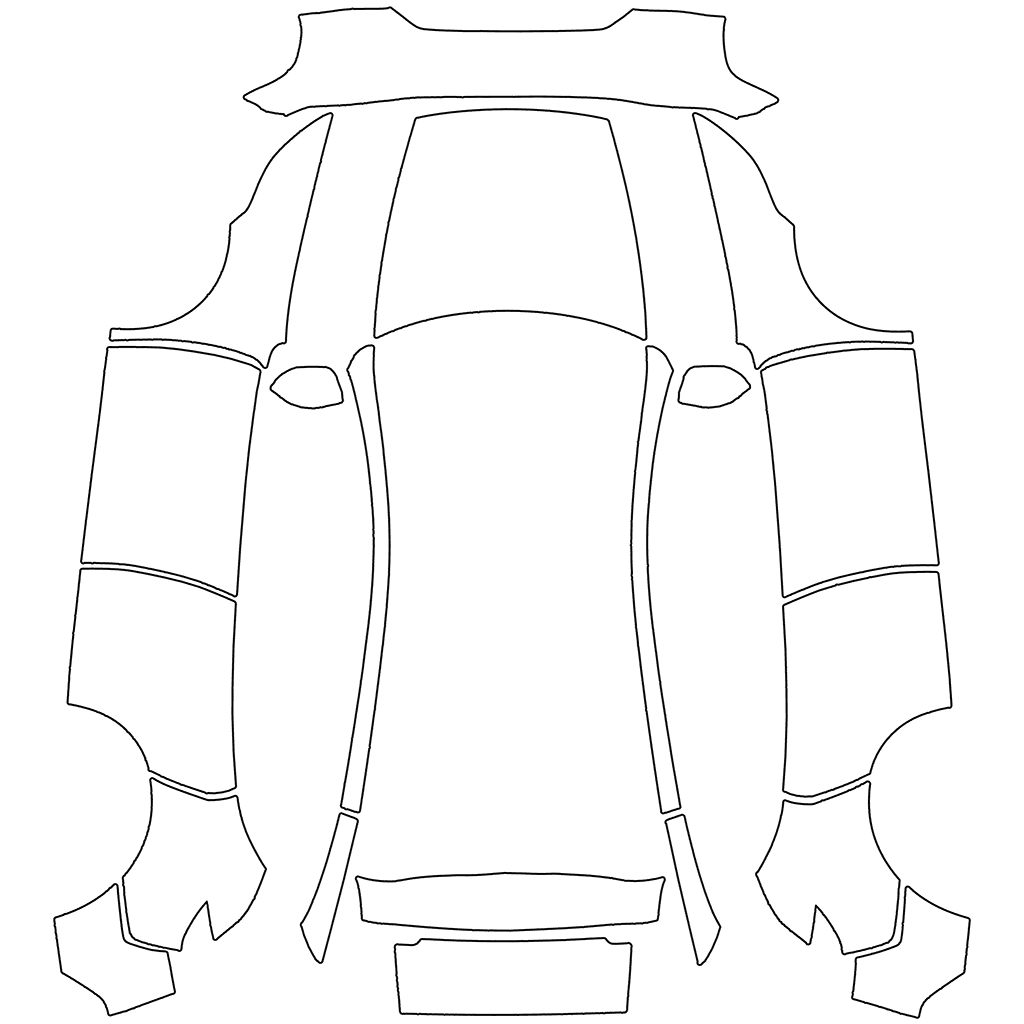
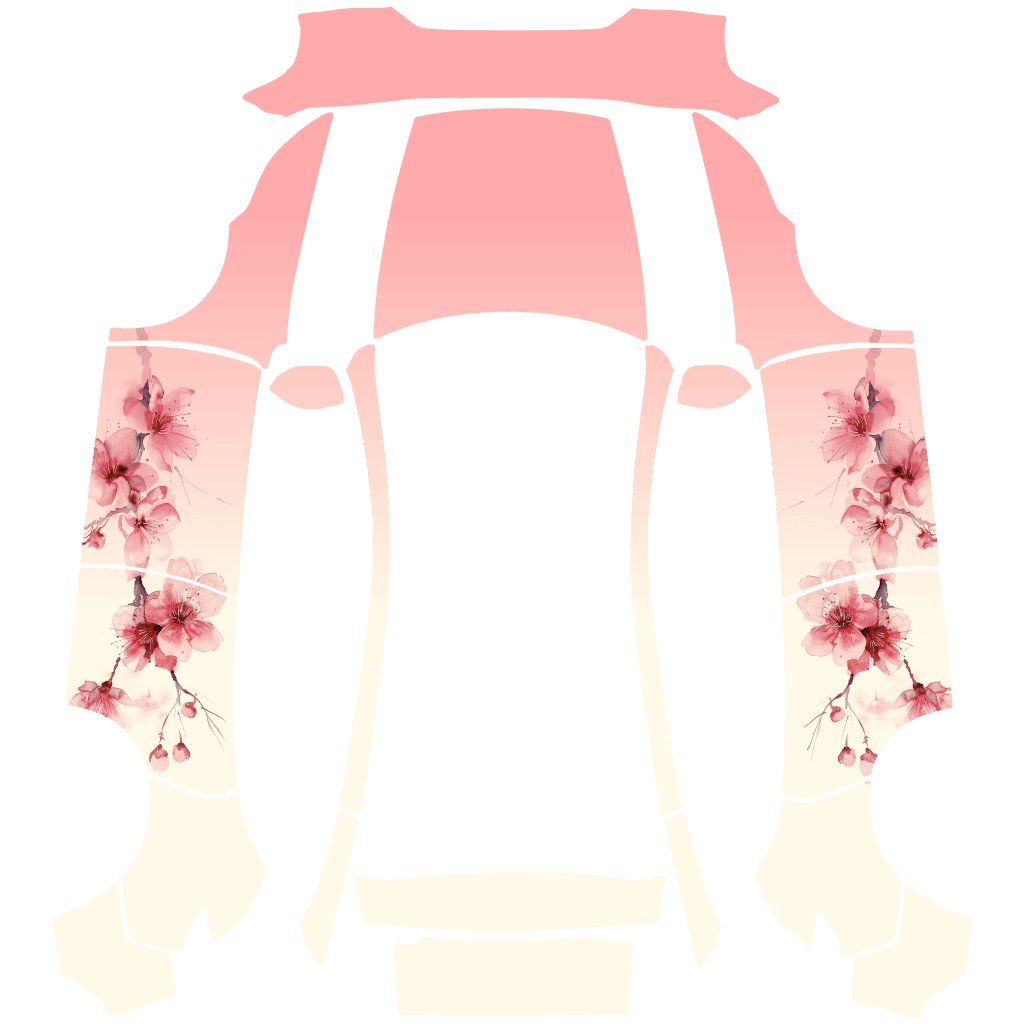
- Match the vehicle model, year and trim. Different Model Y templates can place panels differently.
- Compare the result with the template. Keep the design within body panels; leave black and transparent glass or empty regions unpainted.
- Check text and faces. Front and rear panels can face different directions from side doors in the unfolded image. This screen alone cannot verify every panel's in-car placement.
- If edges bleed or lettering breaks, simplify the requested colors, pattern and placement. Failed requests show an error; supplied examples are not substituted as generated results. Retrying may consume additional Gemini quota.
6. Gallery
A community gallery where you can browse others' designs and like or download them.
- Browse gallery: anyone, no login required
- Share to gallery (on download): login and prior consent required
- Like & download: login required
- My Page: view and delete your own posts (login required)
7. Good to know
- AI results vary each time and are not guaranteed to match official examples (Acid Drip, Sakura, etc.).
- Image generation uses Google Gemini API; charges depend on the model and your project plan.
- Designs published to the gallery are visible to other users. Do not post content that infringes others' rights.
- This site is a fan/personal project, not an official Tesla service.
- See Tesla's official docs and community guides for applying wraps and folder structure.
Tesla, Model 3, Model Y and related trademarks are assets of Tesla, Inc. This service is not affiliated with Tesla.
Trust & verification
Last updated: 2026-11-02
This guide is maintained based on current product behavior and policy pages.
Reference links